NestBox
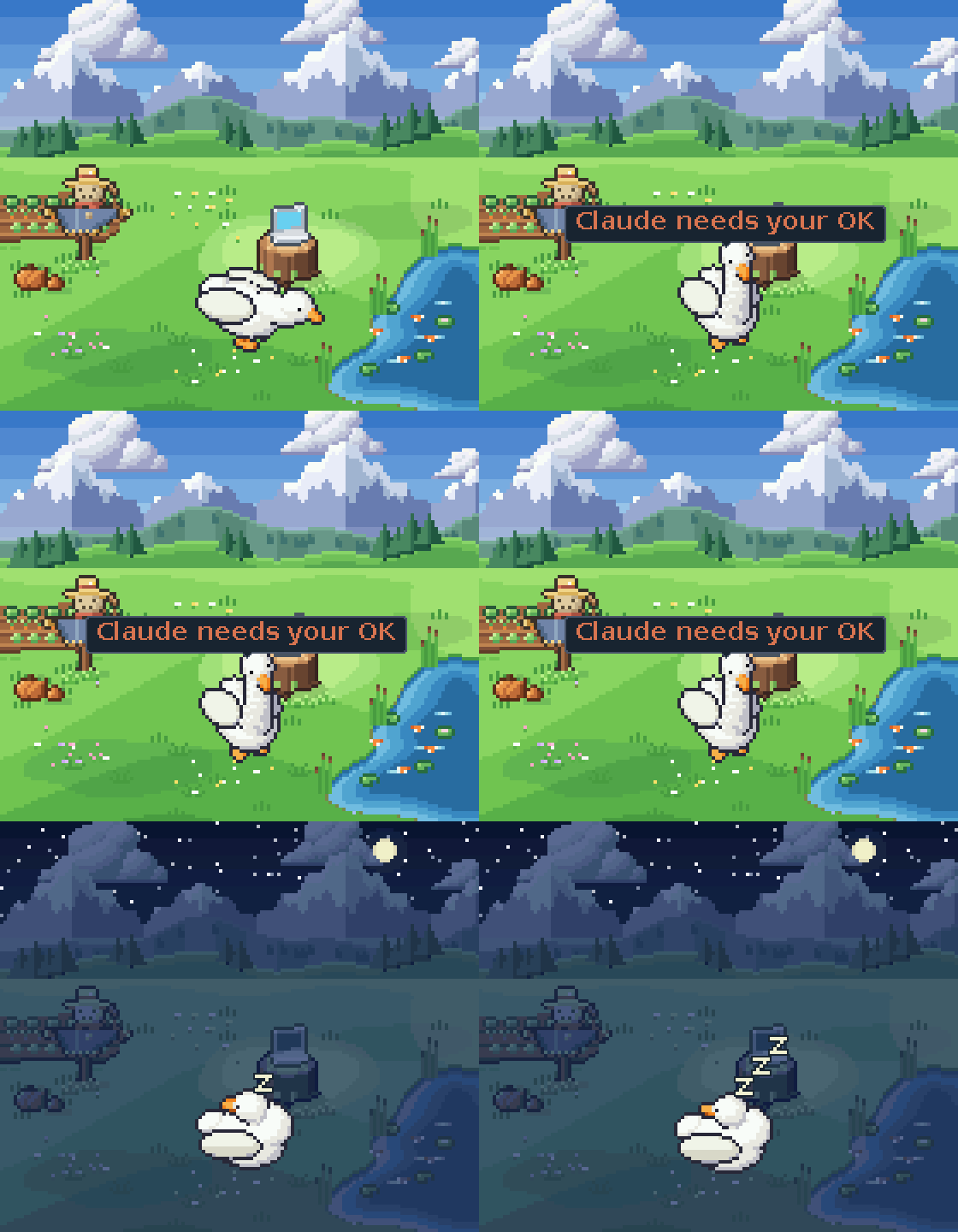
NestBox is a small LCD that sits next to your computer, with a pixel pet living on it. The pet works at its desk while you type, watches while a coding agent works, calls you with a "!" when the agent needs an answer, celebrates a passing build, and goes to bed when the computer sleeps. Anything on the network can drive it with one HTTP request.
The device is a Waveshare ESP32-S3-LCD-1.69. The same C++ engine also runs in a Mac simulator that serves the same HTTP API, so everything here can be tried without the hardware.
In these docs, the device (or NestBox) is the board, or the simulator standing in for it; a pet is a character it shows, such as the goose.
Status: early, version 0.1.0. The engine, the simulator and the Mac companion are tested on every change; the firmware builds but has not yet been verified on hardware.
Quick start (macOS)
Requirements: the Xcode Command Line Tools (xcode-select --install) and Homebrew.
brew install cmake sdl2
cmake -S . -B build
cmake --build build --target nestbox-sim eggs -j
build/nestbox-sim         # the goose in a window, at the device's real size, on port 8080
In another terminal, make it react:
curl -d '{"source":"tests","event":"error"}' http://localhost:8080/v1/event
curl -d '{"state":"party","for":600}' http://localhost:8080/v1/event
curl -d '{"text":"lunch!","anim":"Hop"}' http://localhost:8080/v1/event
To have it follow your typing, build the companion and run it in another terminal; it finds the simulator over Bonjour:
cmake --build build --target nestbox && build/nestboxscripts/build.sh builds everything: the simulator, the nestbox command, the tools and tests, and the menu bar app.
The simulator announces itself over Bonjour as _nestbox._tcp, like the board (which uses port 80). GET / on the device is the API reference; the same text is in docs/api.md.
How it behaves
A pet has 26 named states. Moods last until something changes them (working, typing fast, watching, needs you, busy, party, dancing, quiet, asleep and more); reactions play once (done, error, celebrate, surprised, petted, grumpy, oops and more). Events are plain words that map to states: error is a sad reaction, celebrate celebrates, quiet keeps it still, music adds notes and dancing. A sender can also ask for a state by name, play an animation, or walk the pet through a chain of steps ({"steps": [...]}). Any sender can show a progress ring in the top-right corner, such as a playlist's progress or a usage limit ({"source": "downloads", "meter": 40}).
When nothing is going on, the pet rests and strolls round its floor. The scene follows the local time of day (night from 20:30), and with no computer talking to it the pet sleeps from 23:00 to 7:00.
Coding agents
The device serves an onboarding guide for agents at GET /agents (also /llms.txt): its address, the events to send (working, needs_you, done, error, stop...), and the privacy rules. Ask an agent to read http://<device>.local/agents and connect itself. integrations/claude-code is a ready-made setup for Claude Code; integrations/README.md covers the rest.
The Mac companion
build/nestboxsends the key-press rate (a count from macOS, never which keys), idle seconds, CPU load and whether the screen is locked: every 240 ms while you type, otherwise about once a second. The stream is also the heartbeat: when it stops, the pet goes to sleep.nestbox findlists the devices on the network;nestbox hookturns a Claude Code hook payload into an event.build/NestBox.appis a menu bar app that runs the companion, pairs with a device, puts a new device on Wi-Fi over USB, and shows every message it sends. See companion/mac/app/README.md.
Pets
A pet is one .egg file: animations, palette, scene and a short description. The base pet, a goose, is in pets/goose.egg, and the folder it is packed from is pets/goose/. The simulator also loads eggs from ~/.nestbox/pets/ and picks up new ones while it runs. Switch pets with {"pet": "goose"}, {"pet": "next"}, Tab in the simulator window, or a double press of the board's PWR button.
To make a pet, draw a folder of sprite sheets (docs/pet-folder.md) and pack it:
python3 tools/eggpack/eggpack.py mypet --check
python3 tools/eggpack/eggpack.py mypet -o ~/.nestbox/pets/mypet.egg
The packer needs a build of the engine in build/ (any platform). The file format is specified in docs/egg-format.md.
The simulator
build/nestbox-sim --display round-240                 # another screen: lcd-1.69 (default), square-240, round-240
build/nestbox-sim --headless --port 8081 --speed 2    # no window, clock twice as fast (the tests use this)
build/nestbox-sim --setup                             # fresh out of the box: Wi-Fi setup with a fake radio
build/nestbox-sim --shot out.ppm PET_INDEX STATE MS [TEXT [SIZE AT]]   # one frame to an image
build/nestbox-sim --spec                              # every state and the animations it plays, as JSON
Keys in the window:
| Key | Action |
|---|---|
| 0–4, 6 | hold asleep, wander, idle, working, typing fast, needs you |
| 5, 7, 8, 9 | play done, error, dizzy, waking up |
| W | hold watching (an agent is working) |
| S, Shift+S | step through every named state |
| M | music on or off |
| A | back to automatic |
| Tab, Shift+Tab | next or previous pet |
| D | step through the times of day, then back to the clock |
| U | run Wi-Fi setup again |
| L | show why the pet is in its current state |
| Z, Shift+Z | window size, 1× to 3× the device's real size |
| Q, Esc | quit |
In setup mode, open http://localhost:8080/ at phone width to play the phone. The fake networks are in simulator/sim_radio.h; Home with password sunflower1 joins. GET /screen.bmp returns the screen.
Wi-Fi setup
A device with no saved network opens its own access point, named after its pet (GOOSE-7K3Q, with a new 8-character password each time), and shows a Wi-Fi QR code; a phone joins with one tap and its captive-portal sheet opens the setup page. The device tests the chosen network while the phone stays connected, saves it only if it works, and otherwise explains why (wrong password, out of range, 5 GHz only, needs a login, no address). It then hands the phone over to its address on the home network. The page also sends the phone's time zone, which the device turns into a POSIX rule with summer time. "Just be a pet" skips Wi-Fi.
Firmware
cd firmware/esp32
pio run -t upload        # firmware and the USB drive image
pio run -t uploadfs      # the pets
See firmware/esp32/README.md for flashing, the USB console, names and Bonjour, and firmware/esp32/BOARD.md for the board facts the firmware relies on.
Repository layout
| Path | Contents |
|---|---|
engine/ | The portable C++17 engine, built unchanged into the firmware and the simulator. It has no platform headers and is split into layers, listed below in order; each layer uses only the ones before it. |
engine/util/ | JSON, UTF-8 text, millisecond deadlines, time zones, the QR encoder |
engine/screen/ | Screen profiles, canvas, font, layout, the status bar and bubbles (hud), setup cards |
engine/egg/ | The egg reader |
engine/body/ | The pet: the state table, its stage (scene, floor, paths), movement, the room, the hoop shot, the shelf of pets |
engine/mind/ | The brain: activity, alerts, senders, steps, free time, the local clock; it decides the state |
engine/door/ | The HTTP API, the guide for agents, /v1/spec, and Wi-Fi setup (steps, page, screens) |
engine/host/ | What every device does around the engine: the frame step, egg order, the wire protocol and Bonjour record |
simulator/ | The Mac simulator: SDL window, HTTP server, Bonjour, the fake setup radio |
firmware/esp32/ | The board: LCD, Wi-Fi, USB, IMU, button, console, settings |
companion/mac/ | cli/: the nestbox command; app/: the menu bar app; selftest/: the app's self-test |
integrations/ | Connecting agents and other tools; Claude Code hooks |
pets/ | The base pets as eggs, and the folders they are packed from |
tools/ | eggpack/ (folder to egg), specdoc.py and docgen.cpp (generated docs), demo_gif.py (the animation above), fontgen.py, tzdata.py, qr/ |
tests/ | Unit and end-to-end tests |
docs/ | The egg format, the pet folder, the HTTP API |
Tests
scripts/test_all.sh            # configure, build, run every test with CTest (about 5 minutes)
scripts/test_all.sh --quick    # only the quick tests (seconds)
From a build directory, ctest -L quick runs the unit tests, the packer test, the layer check and the docs check (on Linux too); ctest -L network runs the end-to-end and setup tests against a real simulator on both screen kinds (macOS only). See CONTRIBUTING.md.
Licence
The code is MIT (LICENSE); the base pets' art is CC BY 4.0. Third-party components and their licences are listed in NOTICE.md. Security reports: SECURITY.md.